Creating an account
Visit our site at https://birdbook.il4.tfinnovations.com.
From the main sign-in page, click the Create an account button below the sign in form to navigate to the registration form.
You can also visit the page directly at https://birdbook.il4/tfinnovations.com/register.
Registration
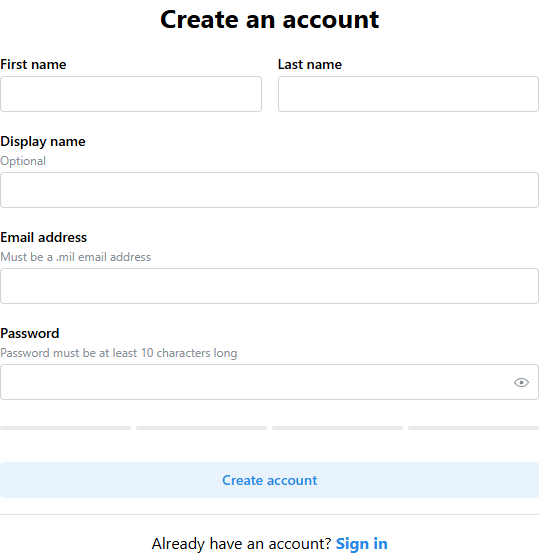
Please enter the requested information into the form in order to create your account.
Display name will be used to identify yourself to your colleagues. Additionally, if you are flightcrew, it will be used to display your callsign on the mission board.
You must use a .mil email address in order to create an account.
Passwords must be at least 10 characters long. Additionally, they must meet or exceed a strength rating using the password meter below the password form field.
Verifying your account
An email to verify your account will be sent to the email address you provided during the registration step.
Please check your inbox and follow the provided link to activate your account. You may need to check your junk or spam folders.
The email will be sent from no-reply.birdbook@tfinnovations.com.
The verification link is only valid for three hours. If you attempt to use it while it is invalid, you will be sent a new verification link.
If you have lost the account verification link, please register again to receive a new link.