Postflight
The postflight page is available to all users.
The postflight page allows users to quickly create write-ups for a given line.
Use the date picker to select the desired flying date and view its schedule. Individual gos may be selected using the go tabs.
Line information
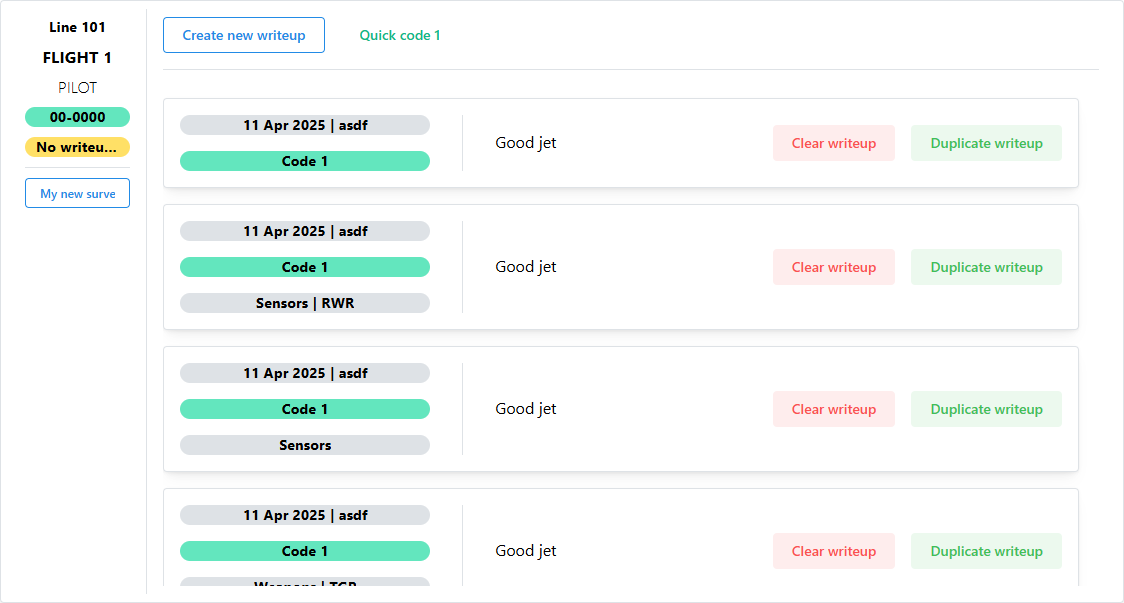
Information about the line and associated aircraft write-ups will be displayed.
If a line has not yet had a write-up written, the No writeup yet icon will be displayed.
Aircraft attributes
If an aircraft attribute is displayed on the mission board, it will also be displayed on the postflight line, allowing users to quickly modify any applicable changes.
Creating write-ups
Users have the ability to create a new write-up, clear existing write-ups, or duplicate an existing write-up.
If the tail number and pilot name exist for the given line, then a Quick code 1 button will appear, allowing pilots to simply click that button to create a new code 1 write-up.
Surveys

Administrators have the ability to create surveys. These surveys will display as buttons below the line information. Clicking on the button will open a dialog window for the survey. Users simply answer the question to submit the survey.
Yes / No questions
Yes / no questions will have buttons for each answer type. Survey behavior depends on how the administrator creates the survey.
Answers that require additional questions will be a blue button while answers that do not will be a green button.
Text questions
Text questions require further user input to answer the question. Click the blue Continue button or green Submit button to complete the question.