MFA management
Time-based One-Time Passwords (TOTP) are a more secure way to enforce multi-factor authentication. These codes are available offline and use an authenticator application such as Google Authenticator or Microsoft Authenticator to generate a code and authenticate the user to the Birdbook.
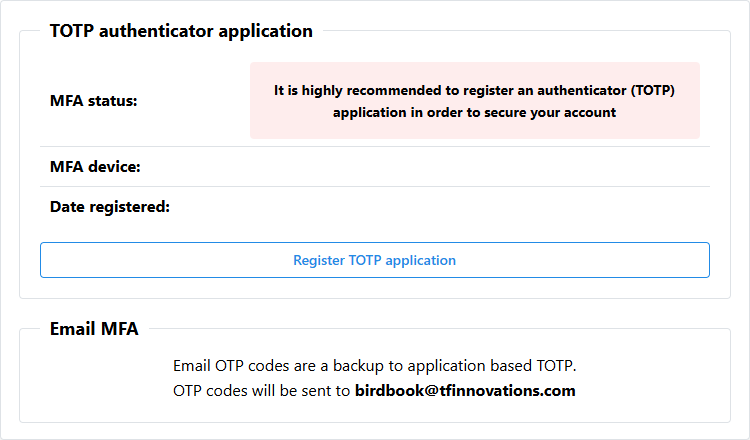
Registration
If a TOTP authenticator application has not yet been registered and it is desired to register one, click the Register TOTP application button.
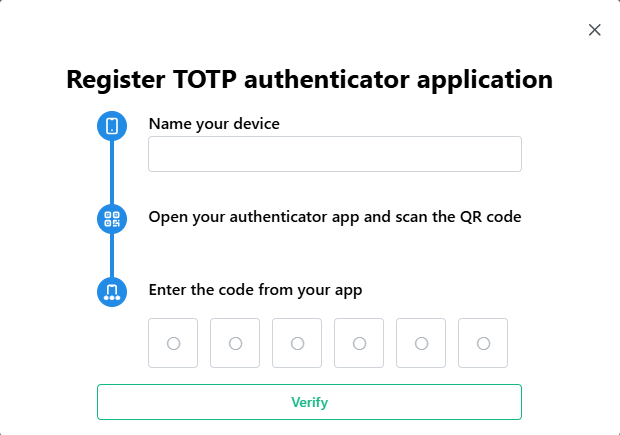
In the window displayed, name the device you wish to use. This will allow you to easily recognize it at a later time.
Open your authenticator application and add a new account. When presented an option on how to add an account, click the Scan a QR code option. Scan the QR code on your screen to immediately synchronize your device.
Verify the synchronization was successful by typing the 6-digit TOTP into the registration form and click Verify.
If successful, the dialog will close and information about your MFA device will be displayed.
Removing TOTP application
In the event users no longer have access to their registered MFA device, they may click the Delete TOTP application button and confirm their decision to remove the TOTP MFA registration from their account. They can then re-register a new TOTP by following the on screen prompts.