Aircraft systems
The aircraft systems page is available to administrators only.
Aircraft systems allow administrators to determine what systems and subsystems to track within the Birdbook. When a system is created, it will be used to populate the System dropdown menu when a user is creating a write-up.
Systems may contain many subsystems. Associating a subsystem under a system will populate the Subsystem dropdown menu when a user is creating a write-up.
Systems
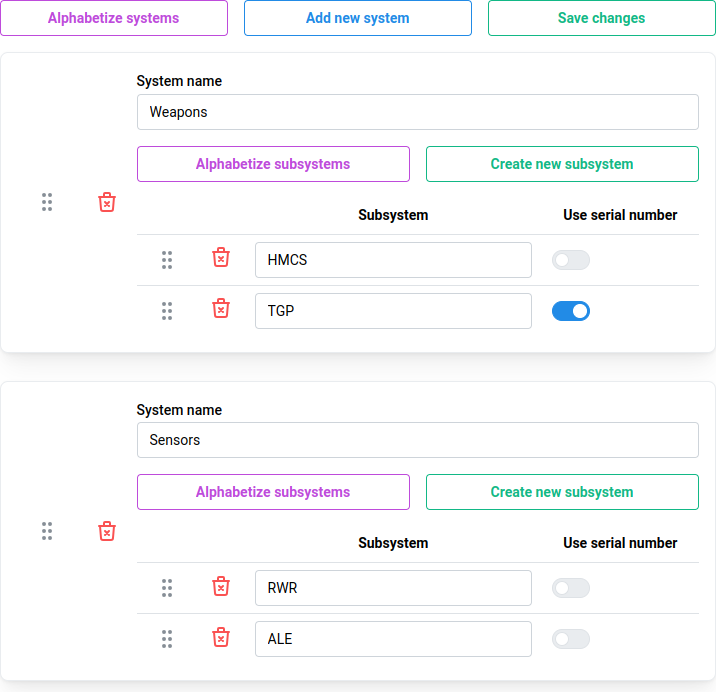
Creating a system
Click the blue Add new system button to create a new system. The System name is a required field.
System names must be unique
Deleting systems
Click the red Delete icon to delete the system and all its subsystems.
Re-ordering systems
Systems are displayed, by default, in the order which they were created. Click and drag the handle (gray dots) to re-order the systems. You can also click the purple Alphabetize systems button to automatically display systems alphabetically.
Subsystems
Creating subsystems
Click the green Create new subsystem button to add a subsystem.
Subsystem names must be unique
Deleting subsystems
Click the red Delete icon to delete the subsystem
Re-ordering subsystems
Subsystems are displayed, by default, in the order which they were created. Click and drag the handle (gray dots) to re-order the subsystems. You can also click the purple Alphabetize subsystems button to automatically display subsystems alphabetically.
Using serial numbers
If the subsystem has a serial number which the organization wishes to track, or associate with a write-up, toggle the switch Use serial number to add the Serial number field in write-ups.
Saving data
Data is not saved automatically, ensure you save your changes by clicking the green Save changes button at the top of the screen.
Action icons

If enough systems are created which causes the window to scroll, the following icons will be displayed in the lower right portion of the screen. This allows for quick actions, such as creating new systems, or saving changes without the need to scroll to the top of the screen.