Schedule schema management
The schedule schema management page is available to Administrators only
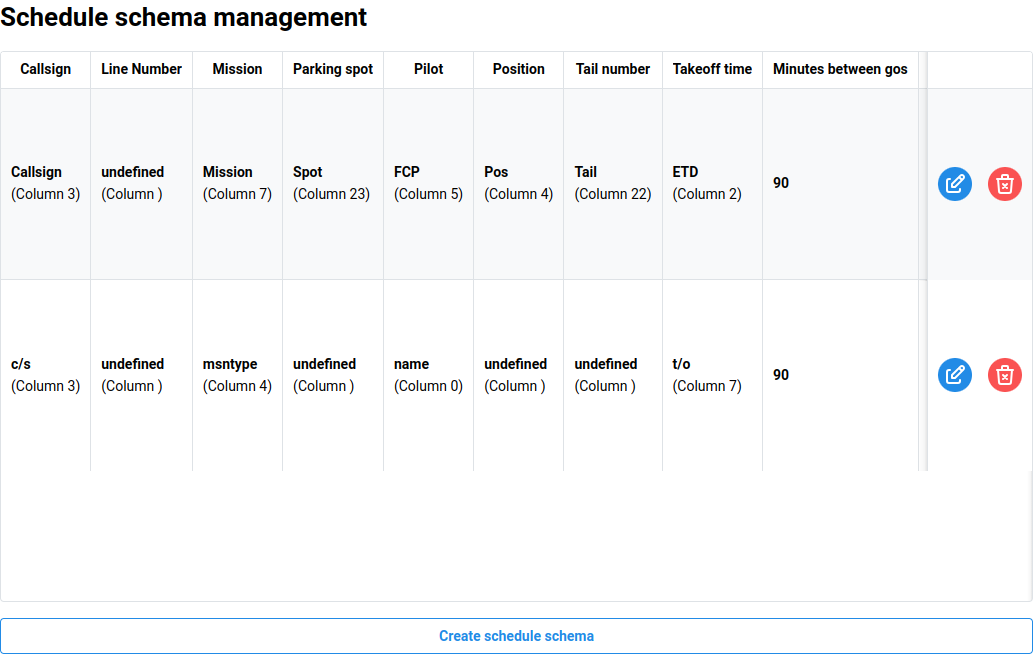
When importing a schedule for the first time, a schedule schema is created. This tells the system which columns contain the needed data to create the schedule. It also saves the text in the header of these columns in order to compare. This ensures that the correct schema is used.
The management page allows administrators to create, modify, or delete schedule schemas.
Creating a schedule schema
To create a new schema, click the Create schedule schema button. This will open a new file selection dialog to navigate to and select a desired schedule export.
Once the schedule is read, a new dialog will open allowing the administrator to verify or select the columns for each data point that is used when creating a schedule.
Modifying a schedule schema
To modify a schema, click the blue Edit button in the far right column. This will open a file selection dialog, which will then allow the administrator to follow the same steps as creating a schedule schema.
Deleting a schedule schema
To delete a schema, click the red Delete button in the far right column. This will open a confirmation dialog to confirm your decision.